
Modular UPS vs Standalone UPS: A Data Center Buyer's Guide
Both architectures deliver double-conversion power—the real question is whether your capacity should grow in modules or arrive in one cabinet
Introduction
Every data center UPS quotation hides an architectural decision behind the kVA figure, and the decision is this: one monolithic cabinet sized for the final load, or a frame filled with plug-in modules that grows as the load does. Manufacturers call the first a standalone (or monolithic) UPS and the second a modular UPS. Both are online double-conversion machines; both protect the load equally well on the day of commissioning. What separates them is how they behave over the following five years—when the load grows, when a module fails, when the service crew arrives, and when the electricity bill arrives.
Buyers get this choice wrong in both directions. Some order a large standalone unit for a load that materializes slowly and spend years running at 30% capacity, where double-conversion efficiency is at its worst. Others buy modular frames for loads that never grow and pay for scalability they never exercise. Neither mistake is fatal, but both are expensive—and both are predictable with a little structure.
This guide compares the two architectures line by line—capacity growth, redundancy, part-load efficiency, footprint, service model and cost—then turns the comparison into a selection table you can apply to a real project. For context on where the UPS sits in the wider facility, start from our data center power equipment range.
Two Architectures, One Goal: What "Modular" and "Standalone" Mean
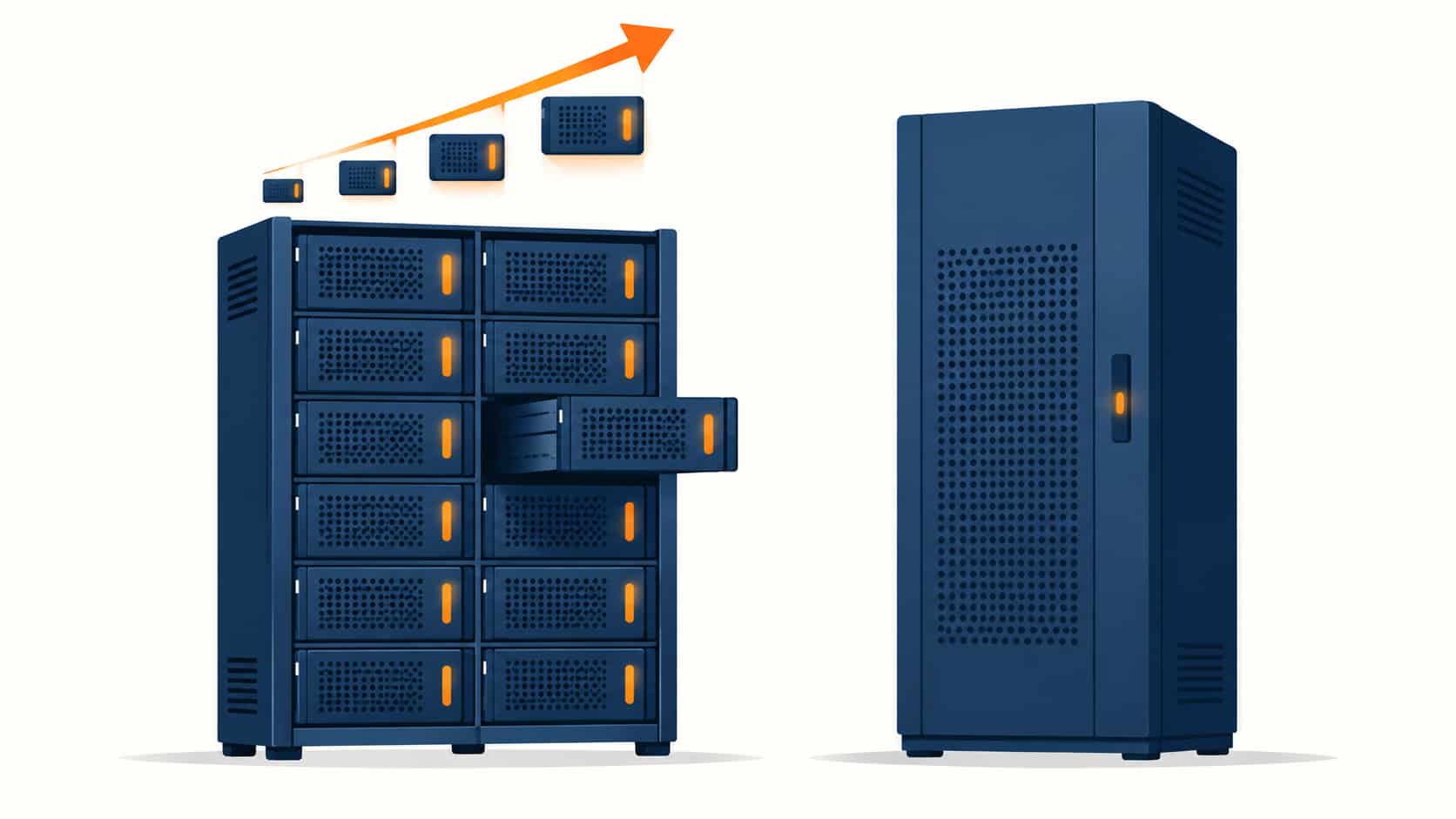
A standalone UPS is a single, self-contained cabinet—rectifier, inverter, battery interface and bypass all engineered as one fixed-rating machine. A 200 kW standalone unit is built from the factory to be 200 kW for life. Scaling means buying another cabinet and paralleling it, and servicing means working on the whole machine (with the load on bypass) or taking the unit out of service.
A modular UPS is a frame—cabinet, bus, bypass, batteries and control—into which standardized power modules slot like blades. Each module contains its own rectifier and inverter; capacity equals the sum of installed modules. A frame might house six 50 kW modules for 300 kW today, with empty slots ready for more, and a failed module slides out hot while the rest carry the load. The frame’s ceiling is fixed, but within it the rating is a configuration, not a purchase.
One clarification prevents most confusion: “modular” refers to the power electronics, not the batteries. Both architectures take VRLA or Li-ion strings, and battery questions—chemistry, monitoring, service life—deserve their own diligence in either case.
How the Two Architectures Differ, Line by Line
The differences that matter to a buyer are summarized below, then unpacked in the sections that follow:
| Aspect | Modular UPS | Standalone (Monolithic) UPS |
|---|---|---|
| Capacity growth | Add hot-swap modules into spare frame slots; minutes to commission | Buy another unit and parallel it, or replace with a larger one |
| Redundancy model | Internal: one extra module inside the frame covers a failed one | External: a second parallel unit required for true redundancy |
| Efficiency at partial load | Highâsleeping modules keep the live ones near their sweet spot | Fixedâsingle unit runs deep in its inefficiency curve at light load |
| Footprint and weight | Compact frame; concentrated floor loading; high power density | Larger footprint; weight spread over more cabinets |
| Service and repair | Hot-swap module by site staff; frame stays powered | Specialist engineer attends; load rides bypass during work |
| Failure impact | Module loss costs capacity, not the load; redundancy absorbs it | Internal fault can drop the whole unit to bypass in one step |
| Cost structure | Higher frame price per kW today; modules bought as load grows | Lower entry cost per kW; expansion arrives as a big step |
Redundancy: Inside the Frame or Between Frames
Redundancy is where the architectures diverge philosophically. A modular frame builds redundancy inward: install six modules for a 300 kW load and the frame is inherently N+1, because five modules carry the load if one fails. There is no transfer event, no second cabinet to buy—the surviving modules simply absorb the load while the failed one waits for a technician. The catch is that the frame itself—its bypass, its control, its backplane—remains a single point of failure that internal module redundancy does not cover.
Standalone units build redundancy outward: true N+1 means a second, complete, independent cabinet paralleled with the first, each with its own bypass and controls. That isolation is genuinely valuable—a fault that would corrupt one frame’s backplane cannot cross into a separate cabinet. It also costs more: two machines, two batteries sets at minimum rating, and switchgear to match. Many serious designs end up combining both ideas—modular frames, paralleled—which is exactly the kind of architecture question our guide to N+1 and 2N redundancy decisions addresses for teams planning resilience levels.
Efficiency Where It Actually Happens: Partial Load
Here is the least visible and most expensive difference. Double-conversion UPS units have a loss curve: near full load they convert at 94–97% efficiency, but losses grow proportionally as load falls, and a monolithic unit loafing at 30% load can waste several percentage points more—every hour, for years. Data centers make this worse by design: loads grow over 24–36 months, so a UPS sized for day-three capacity spends its first years deep in the partial-load zone.
Modular architecture attacks the problem structurally. The control system runs the minimum number of modules needed for the current load (plus the redundancy margin), keeping each live module near its efficiency sweet spot, and wakes additional modules as load grows. The efficiency benefit is not a mode you enable—it is a property of matching capacity to load dynamically. The same logic applies to the rest of the power train, which is why we tell buyers to think the same way about upstream equipment: our guide to transformer capacity sizing makes the identical argument about not buying the final rating on day one.
Scalability and the Cost of Being Wrong
Scalability sounds like a virtue in the abstract, but it is really a bet about your own forecast. If the load is known and stable—a single-tenant facility with contracted capacity, a bank floor with fixed footprint—a standalone unit delivers the final rating at the best cost per kW, and modularity buys nothing. If the load is a forecast—colocation halls, cloud regions, anything sold by the rack—the modular frame converts sizing error from a capital problem into a configuration change, because you bought the ceiling, not the capacity.
Timing matters too, and current market conditions sharpen it. Expansion by a new standalone cabinet means a new manufacturing slot and factory test cycle; our review of the switchgear and transformer lead-time situation describes how long those queues have become for the upstream equipment feeding the same room. Adding modules to an existing frame is faster, but only if spare slots and headroom were bought at the start—a decision that must be made before the lead times become relevant, not after.
Footprint, Weight and Room Logistics
Physical reality decides some projects before the electrical math does. Modular frames concentrate a lot of rating into little floor area— attractive in downtown retrofits where the electrical room is whatever was left over—but they are heavy per square meter, and structural engineers occasionally veto the slab loading. Standalone systems spread cabinets around the room, which eases floor loading and gives maintenance access per unit, at the cost of more total area and more cable runs.
Access is the other logistics question. Modules are heavy but handled; a 200 kW standalone cabinet is a crane-or-forklift event with a route through doorways planned in advance. Check door widths, corridor turns, floor elevators and the removal path for failed units in both directions—retrofit projects discover these constraints late and expensively.
Which One Should You Buy?
Strip the marketing away and the decision reduces to load certainty, growth pattern, downtime tolerance and budget shape. The table below maps common situations to a lean:
| Your Situation | Lean Toward | Why |
|---|---|---|
| Load fixed and certain from day one (single tenant, contracted capacity) | Standalone | Best cost per kW at the final rating; scalability is wasted spend |
| Load grows in steps or is a forecast (colocation, cloud region) | Modular | Pay-as-you-grow modules convert forecast error into configuration |
| The load must never see the load down for service | Modular, or paralleled standalone | Hot-swap modules or independent units allow service without transfer |
| Small electrical room, high power density requirement | Modular | Compact frame delivers the rating in minimal floor area |
| Capital-capped project buying today's load only | Standalone | Lowest entry cost; expansion can be paralleled later if needed |
| Resilience roadmap heading to N+1 or 2N with growth | Modular frames, paralleled | Internal module redundancy now, frame-level redundancy as you scale |
| Remote or low-support site with limited technical staff | Modular | Hot-swap replacement by site staff beats waiting for specialist visits |
When Neither Architecture Is the Answer
Both architectures assume the load fits in low-voltage cabinets. Very large campuses—tens of megawatts—move into medium-voltage UPS territory, where the conversion chain and its batteries sit upstream of the LV distribution entirely, and the modular-versus-monolithic debate restarts at a different voltage level. If your facility is heading that way, the UPS conversation belongs in the same meeting as the main substation design, not after it.
And for facilities where the energy tier itself is changing, the UPS’s role is being redefined rather than replaced. Battery storage systems increasingly cover the bridge function the UPS used to own alone—our overview of data center energy storage and backup describes how the seconds-tier and minutes-tier responsibilities are being split between UPS batteries and BESS. The architecture you pick should assume that conversation is coming.
Questions to Ask Before You Order
Whichever architecture wins, these questions make the quotation honest:
- Frame ceiling and module rating: maximum kW the frame supports, module size, and cost per module—so growth is priced today, not negotiated later.
- Redundancy accounting: is the quoted rating the N capacity or the N+1 capacity? Confirm which figure includes the redundancy module.
- Module-level data: per-module efficiency at 25/50/75/100% load, and the controller’s sleep/wake logic for light-load operation.
- Failure behavior: exactly what happens electrically when one module fails—transfer, alarm, derating curve—and how the bypass behaves frame-wide.
- Hot-swap logistics: can site staff really replace modules, what training and spares does that require, and what is the module warranty?
- Battery plan: chemistry, monitoring depth, and whether the battery system scales with the modules or arrives complete.
- Parallel readiness: for standalone bids, the cost and scope of paralleling a second unit later—cabling, controls, switchgear.
- Testing: witnessed FAT including module pull-out and failure simulation, with the report format agreed before order.
Conclusion
Modular and standalone UPS are answers to different questions. Standalone answers “what does this load cost?”—and wins when the load is known. Modular answers “what will this load become?”—and wins when the load is a forecast, when service downtime is unacceptable, or when floor space is the scarce resource. Both deliver the same double-conversion protection; neither forgives a bad load estimate made carelessly.
Run the selection table against your real situation, price the growth path in the first quotation rather than the third, and insist on failure-behavior demonstrations at FAT. When you are ready to compare real offers, the team at KXY E-Power Group quotes both architectures—and the switchgear, transfer and storage equipment around them—as one coordinated power system.
Frequently Asked Questions
Recent Posts
Voltage Stabilizers vs UPS: Do You Need Both?
Voltage Stabilizers vs UPS: Do You Need Both? One device fixes how high or low the voltage is; the other fixes whether there is voltage
Energy Storage for Data Centers: A Growing Backup Power Option
Energy Storage for Data Centers: A Growing Backup Power Option Batteries have always backed up data centers in the form of UPS strings. Grid-scale BESS
Thermal Runaway in Lithium Batteries: What BESS Buyers Should Understand
Thermal Runaway in Lithium Batteries: What BESS Buyers Should Understand How thermal runaway starts, how it propagates, and which evidence buyers should require before approving